
check_circle Purchase Complete
Thank you for your purchase!
photo_camera Photo Ready! - Click to expand
Complete your purchase to download your official passport photo.
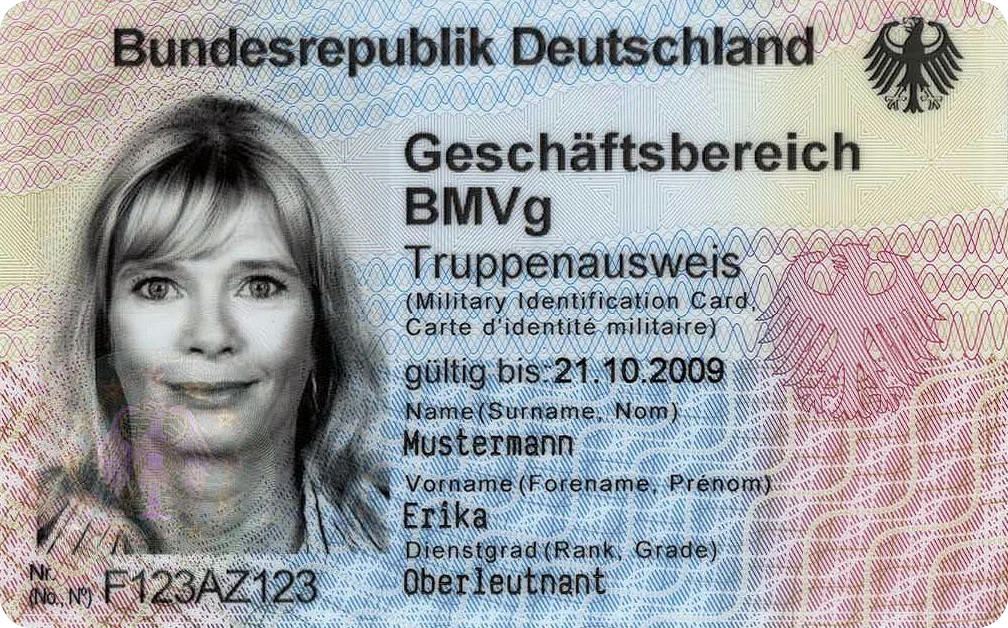
Photo for the Bundeswehr Truppenausweis 2026 – Requirements & Uniform
Updated on 11.10.2026
For the electronic Truppenausweis (eTA), the Bundeswehr requires a current, biometric photo, as a rule in uniform and without headgear. This guide covers the requirements, who normally takes the photo, and how soldiers and reservists can create a suitable picture themselves.
What is the electronic Truppenausweis?
The electronic Truppenausweis (eTA) is the service ID of Bundeswehr soldiers. Reservists who have been appointed to a reserve service relationship receive it as well. The chip card is produced by the Bundesdruckerei and shows the photo along with name, rank, height and eye colour.
Photo requirements for the Truppenausweis
The Bundeswehr regulates the photo in General Regulation A-1480/5 “Dienst- und Truppenausweis”. It states:
- Biometric: the photo must meet the standard of German passports and ID cards (ICAO compliant), which means 35 × 45 mm in portrait format with a face height of 32 to 36 mm.
- Current: the picture shows you as you look today.
- As a rule in uniform, following the Bundeswehr dress regulations.
- No headgear: no beret, no side cap, no field cap.
- Eyes open and clearly visible, no dark lenses, neutral expression, looking straight at the camera.
- Light, plain background without shadows, sharp and evenly lit.
Uniform in the photo: what applies?
This is where the Truppenausweis differs from every civilian ID. Uniform parts are forbidden in photos for the German ID card and passport, while for the Truppenausweis the uniform is the rule.
- Wear your uniform neatly and completely, with the correct rank insignia. Take off your headgear.
- Your unit decides which uniform is expected. Ask your company sergeant major, the orderly room or the LRA before taking the picture.
- The photo in uniform is not accepted for the German ID card, passport or driving licence. You need a second picture in civilian clothes for those.
Who takes the photo, and when do you need your own?
In many cases you do not need to bring a photo at all. The regulation provides that photos are taken within the Bundeswehr where possible.
- Units with suitable equipment take the picture themselves. Where self-service terminals exist, they are to be used first.
- Recruits: the official checklists for the first day of service ask for a valid ID card or passport for the Truppenausweis, but not for passport photos. Your welcome letter is what counts.
- Your own photo is worth it if your unit has no camera station, if you are a reservist preparing the ID before your next period of service, or if you do not like the terminal picture. The regulation explicitly allows the photo to be presented or sent to the LRA electronically.
How to take the Truppenausweis photo yourself
You do not need a photo studio for a biometric picture in uniform. A smartphone and a light wall are enough:
When do you need a new Truppenausweis and a new photo?
A new ID is issued in these cases, and each one requires a current photo:
- The validity date has passed.
- The ID is damaged or lost. You must report a loss immediately and have the certificates blocked.
- Visible data has changed, for example your name after marriage.
Create a biometric photo for the Truppenausweis
Upload your photo in uniform. We crop it to the biometric format and check it, from home or from your barracks room.
Create Truppenausweis photoFrequently asked questions about the Truppenausweis photo
Do I have to wear uniform in the Truppenausweis photo?
Yes, as a rule. Bundeswehr regulation A-1480/5 requires biometric photos in uniform without headgear for the electronic Truppenausweis. Your unit decides which uniform is expected.
May I wear a beret or side cap in the picture?
No. The photo is taken without headgear. The ID office rejects pictures with headgear during the visual check.
Can I use my ID card photo for the Truppenausweis?
Usually not, because it shows you in civilian clothes. Conversely, the photo in uniform is not accepted for the German ID card or passport, because the Passport Regulation forbids uniform parts in the photo.
Do I have to bring passport photos on my first day of service?
Mostly not. Official checklists for the first day of service list a valid ID card or passport as the prerequisite for the Truppenausweis, but no passport photos. The photo is then taken on site. What matters is what your welcome letter says.
May I take the Truppenausweis photo myself?
The regulation allows the photo to be presented or sent to the ID office electronically, as a JPG with a unique file name. Bundeswehr equipment is to be used first, however. So ask your LRA whether it accepts your own picture.
Do I need a new photo after a promotion?
No. Promotions up to and including Oberst (colonel) are marked on the Truppenausweis with a security sticker. A new ID is only needed on expiry, damage, loss or changed ID data.
Conclusion
The Truppenausweis photo is a biometric passport photo with one special feature: uniform on, headgear off. Often the unit takes the picture itself. If you may or must submit your own photo, you can create it with our passport photo generator in a few minutes.
Sources and legal basis
This article is based on Bundeswehr regulation A-1480/5 (version 3.4, as of October 2021) and the sources below. Newer versions may differ; the information from your unit is binding. Passbild-SelberMachen.com is a private provider and is not affiliated with the Bundeswehr.
- Bundeswehr: General Regulation A-1480/5 “Dienst- und Truppenausweis” (published via FragDenStaat, in German)
- German Passport Regulation (PassV), § 16: photo without uniform parts
- German Reservists Act (ResG), § 4: reserve service relationship
- Bundeswehr: checklist for the first day of service (Spezialpionierregiment 164, Husum, in German)